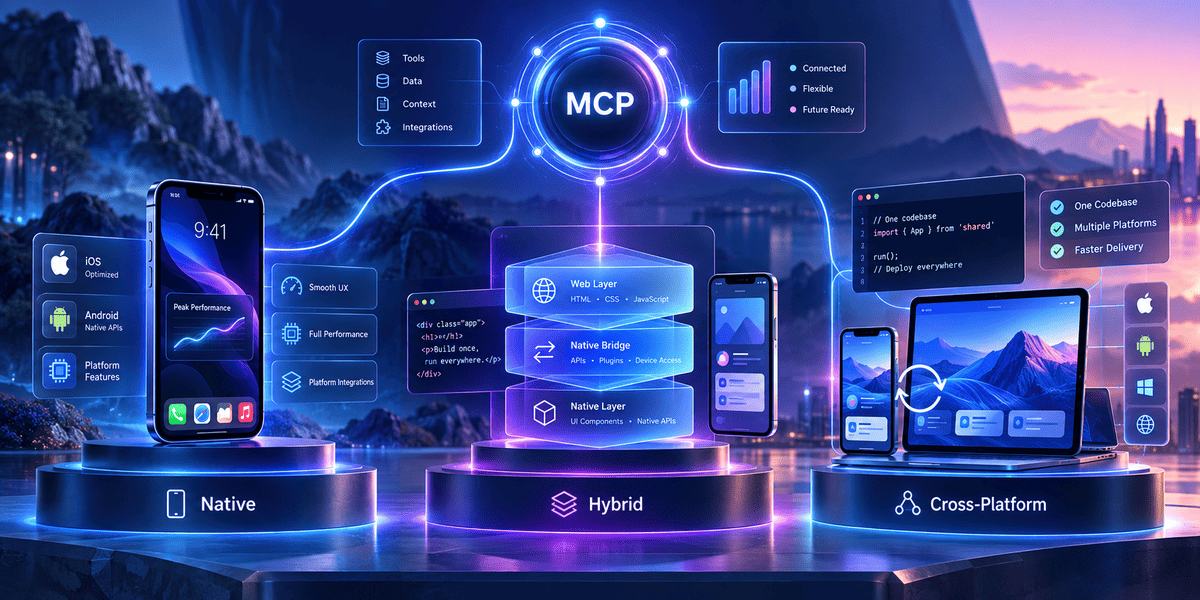


Mobile apps are changing.
A few years ago, most app decisions started with questions like:
Should we build for iOS first?
Should we use Flutter?
Will React Native save development time?
Those questions still matter.
But AI has added another layer.
A modern app may need to search company data, create a support ticket, check an order, read a document, update a CRM, or trigger a workflow.
The AI model cannot safely do all of that by itself.
It needs a structured way to reach the tools and data around it.
That is where Model Context Protocol, or MCP, comes in.
MCP does not replace native, hybrid, or cross-platform development. It solves a different problem.
Your mobile architecture decides how the app is built.
MCP helps decide how an AI feature connects to tools, data, and services.
Understanding the difference can save a lot of confusion when planning an AI-powered mobile app development.
What Is MCP?
MCP stands for Model Context Protocol.
It is an open protocol that gives AI applications a standard way to connect with external tools and data sources.
Instead of creating a custom integration for every AI model and every business system, MCP provides a common structure for that communication. The official MCP project describes it as an open protocol for connecting LLM applications with external data sources and tools.
Think about a customer support app.
A user asks:
“Where is my order?”
The AI needs more than language skills.
It may need to:
Identify the customer.
Check the order system.
Read the delivery status.
Find the latest tracking event.
Then turn that information into a useful answer.
Without a standard protocol, developers may create separate custom connections for each system.
With MCP, those tools can be exposed in a consistent way.
What Does an MCP Server Do?
An MCP server exposes useful capabilities to an AI application.
Those capabilities can include tools, resources, and prompts.
A tool may perform an action.
For example:
check_order_status
A resource may provide information.
For example:
company_return_policy
A prompt may provide a reusable workflow or instruction.
The application can discover what the server offers and use the relevant capability when needed.
Official MCP SDKs currently support several languages, including TypeScript, Python, Java, Kotlin, C#, Go, Ruby, Rust, PHP, and Swift.
That matters for mobile development because MCP is no longer limited to one programming ecosystem.
MCP Does Not Decide How Your Mobile App Is Built
This distinction is important.
MCP is not an alternative to:
Native development.
React Native.
Flutter.
Hybrid development.
It sits at another layer of the system.
Imagine this architecture:
Mobile App → Backend → AI Layer → MCP → Business Tools and Data
Your mobile app could be native.
It could be Flutter.
It could be React Native.
The MCP layer can still serve the same purpose.
This means the choice between native, hybrid, and cross-platform development should still be based on the needs of the product.
MCP should not become the reason you choose one mobile framework over another unless the AI integration creates a specific technical requirement.
What Is a Native Mobile App?
A native app is built specifically for one operating system.
For iOS, teams commonly work with Swift and Apple's development tools.
For Android, Kotlin is a common choice.
The main advantage is direct access to the platform.
A native application can work closely with:
Camera
Bluetooth
Location
Microphone
Biometrics
Background services
Notifications
Device storage
Sensors
Other operating-system features
There is less abstraction between your code and the phone.
That can be important when the app depends heavily on the device itself.
How Does MCP Fit Into a Native App?
Native development is becoming an interesting option for MCP-powered mobile products.
The MCP ecosystem includes official Swift and Kotlin SDKs. The Swift SDK supports MCP client and server components across Apple platforms, including iOS, while the Kotlin SDK supports Kotlin Multiplatform and client/server implementations.
That gives developers several architectural choices.
For example:
iOS App → MCP Client → Remote MCP Server → Company Systems
Or:
Android App → Secure Backend → MCP Services → Business Tools
You do not need to put every part of the AI system inside the mobile application.
In many business apps, keeping sensitive integrations behind a secure backend is still the better design.
When Does Native Development Make Sense?
Native development becomes attractive when the product depends heavily on device capabilities.
Imagine a field inspection app.
A worker opens the app at a customer site.
They take several photos.
The app captures location.
Voice notes are recorded.
Some information may be processed on the device.
The AI then needs to check customer details, previous jobs, or equipment records through connected business systems.
In that type of product, deep device integration may matter more than maximum code sharing.
Native development can be a sensible choice.
What Are the Downsides of Native Apps?
The biggest issue is usually development effort.
If you need both iOS and Android, you may have separate codebases and platform-specific work.
A change may need to be implemented twice.
Testing is also split between platforms.
You may need developers with different skills.
For some businesses, that extra control is worth the cost.
For others, it creates work they do not need.
What Is a Hybrid Mobile App?
A hybrid app normally combines web technologies with a native application container.
The interface may use HTML, CSS, and JavaScript, while a native layer gives the application access to device functionality.
Frameworks such as Ionic and Capacitor are common examples of this approach.
Hybrid development can be useful when a business already has strong web-development skills and does not need deep native behaviour throughout the application.
How Does MCP Work With Hybrid Apps?
For most hybrid business apps, I would avoid putting sensitive MCP access directly into the web-facing layer.
A cleaner architecture may look like:
Hybrid App → Secure API → AI Service → MCP Servers
The mobile application handles the user experience.
The backend handles authentication, AI requests, business logic, and MCP connections.
This approach also makes it easier to protect credentials.
A user should not be able to extract a sensitive integration key simply by inspecting the mobile application.
When Does a Hybrid App Make Sense?
Hybrid development can work well for apps that are mostly forms, dashboards, content, accounts, and standard business workflows.
For example, consider an internal HR application.
Employees may need to:
Check leave balance.
Request time off.
Search company policies.
Update contact details.
Ask HR questions.
An AI assistant could use MCP to search HR information or trigger approved workflows.
The mobile interface itself may not need advanced graphics or heavy device integration.
A hybrid approach may be enough.
Where Can Hybrid Apps Struggle?
Problems often appear when a product becomes heavily dependent on native behaviour.
Complex camera workflows, advanced Bluetooth use, graphics, background processing, or highly platform-specific interactions can require extra bridge work.
That does not make hybrid development bad.
It simply means the approach works better for some products than others.
The mistake is choosing it only because one codebase sounds cheaper.
What Is a Cross-Platform Mobile App?
Cross-platform development tries to share much of the application code across iOS and Android while still producing mobile applications for both platforms.
Flutter and React Native are two well-known examples.
This approach has become popular because many businesses want a middle ground.
They want more native capability than a simple web-based app but do not want to maintain completely separate iOS and Android products.
How Does MCP Fit Into React Native or Flutter?
A cross-platform application will often use MCP through a backend service.
For example:
React Native App
↓
Application API
↓
AI Orchestration Layer
↓
MCP Client
↓
CRM / Database / Search / Business Tools
The user does not need to know that MCP is involved.
They simply ask the app:
“Show me the last three service visits for this customer.”
The AI layer decides which approved tool it needs.
The MCP server provides access to that capability.
The result comes back to the app.
This separation can make the mobile application easier to maintain.
Could MCP Run Closer to the Mobile App?
Yes.
There are official SDKs that make native MCP clients possible, and the ecosystem around mobile MCP continues to develop. The current Kotlin SDK, for example, supports transports including Streamable HTTP, SSE, and WebSocket in addition to stdio.
But putting something on the device simply because it is technically possible is not always the right choice.
Ask what you gain.
Direct mobile integration may be useful when the AI needs controlled access to local capabilities.
For example:
Calendar
Local files
Camera output
Location
Contacts
On-device data
Offline workflows
For normal business integrations such as CRM, payments, ERP, or company databases, a backend-controlled MCP architecture will often be easier to secure and manage.
Native vs Hybrid vs Cross-Platform: What Is the Real Difference?
Here is the practical comparison.

This table should be treated as a starting point.
Real products rarely fit perfectly into one row.
Which App Type Is Best for MCP?
There is no single answer.
MCP does not automatically make native development better.
It does not automatically make React Native or Flutter better either.
Choose based on what the mobile app needs to do.
Choose Native When the Device Is Central to the Product
Native development can be the stronger option when you need deep operating-system access, complex background work, high-performance graphics, demanding Bluetooth workflows, or platform-specific behaviour.
It can also make sense when MCP-powered AI needs to interact closely with native device capabilities.
Choose Hybrid When the App Is Mostly a Web Workflow
If the product is mainly dashboards, forms, content, account management, and simple workflows, hybrid development may keep development straightforward.
MCP and AI integrations can remain in the backend.
Choose Cross-Platform When You Need Balance
For many business apps, React Native or Flutter can provide a useful balance between shared code and native capability.
This is why the decision often comes down to the actual product rather than the AI layer.
A Real Example: An AI-Powered Field Service App
Consider a company with technicians who repair equipment.
Today, a technician finishes a job and types a report manually.
The company wants an AI-powered mobile app.
The new workflow could be:
The technician speaks notes.
The app converts them into structured information.
Photos are attached.
The AI identifies missing details.
Customer and equipment history are retrieved.
A job report is prepared.
The technician reviews it.
The report is submitted.
MCP could help connect the AI to:
Customer records
Equipment history
Parts inventory
Job-management software
Internal documentation
The mobile architecture is a separate decision.
If the product needs advanced camera use, offline processing, GPS, and strong device control, native development may be attractive.
If the company wants one codebase with good native access, Flutter or React Native may make more sense.
MCP works around those choices rather than replacing them.
A Better MCP Architecture for Most Business Apps
It can be tempting to connect the mobile application directly to everything.
I would be careful with that design.
For many commercial apps, a safer structure is:
Mobile App
↓
Authentication + Backend
↓
AI Orchestration
↓
MCP Client
↓
Approved MCP Servers
↓
Business Systems
There are several advantages.
The mobile app does not need powerful business-system credentials.
The backend can check permissions.
Tool calls can be logged.
Sensitive actions can require approval.
MCP servers can change without rebuilding the complete mobile application.
AI models can also be replaced without redesigning the app interface.
That separation can matter a lot as the product grows.
Security Matters More Once AI Can Take Actions
An AI chatbot that only answers questions has limited power.
An AI assistant that can issue refunds, create tickets, change appointments, send messages, or update records has much more.
MCP makes tool connectivity easier.
It does not make every tool call automatically safe.
A production application still needs rules.
For example, suppose a user says:
“Cancel my booking and refund the money.”
The AI should not simply call every available tool.
The system may need to:
Confirm the user's identity.
Check whether the booking belongs to them.
Check the cancellation policy.
Calculate the allowed refund.
Ask for confirmation.
Then perform the action.
MCP provides the connection.
Your application still owns the business rules.
Do Not Give the AI Every Tool
More integrations do not automatically make an AI assistant better.
Start with the smallest set of tools needed for the job.
A customer support assistant may only need:
Order lookup.
Delivery status.
Returns policy.
Support-ticket creation.
It probably does not need unrestricted database access.
The same principle should apply to mobile applications.
Give the AI enough access to complete the workflow, not enough access to run the entire company.
MCP Does Not Remove the Need for APIs
This is another common misunderstanding.
MCP does not mean normal APIs disappear.
Your systems will still have APIs.
Your mobile application may still communicate with a backend using REST, GraphQL, WebSocket, or another protocol.
MCP provides a standard AI-facing layer for exposing tools and context.
For example:
Your payment system already has an API.
You probably do not rebuild the payment platform around MCP.
Instead, an MCP server may expose a carefully controlled check_payment_status tool that uses the existing API underneath.
That distinction helps keep architecture clean.
Is MCP Useful Without AI?
Usually, MCP becomes valuable when an AI model or agent needs controlled access to external capabilities.
If your mobile app simply sends normal requests to a backend, adding MCP may create unnecessary complexity.
You do not need MCP to:
Load a product list.
Submit a contact form.
Update a user profile.
Process a standard login.
Call a normal API.
Use it when the AI itself needs to understand available tools or context and decide how to use them.
Should Every AI Mobile App Use MCP?
No.
Imagine an app with one AI feature:
A user enters text.
The app sends it to an LLM.
The model rewrites the text.
The result comes back.
There may be no reason to introduce MCP.
Now consider a different application.
The assistant needs to search company documents, check CRM data, create tickets, query inventory, update appointments, and trigger approved workflows.
MCP becomes much more interesting.
The more systems the AI needs to interact with, the stronger the case for a standard integration layer.
Common Mistakes When Planning MCP Mobile Apps
Starting With MCP Instead of the User Problem
Nobody downloads an application because it supports MCP.
They download it because it solves something.
Start there.
Putting Sensitive Keys Inside the App
Mobile applications run on devices you do not control.
Treat client-side code accordingly.
Keep sensitive credentials and high-risk integrations behind secure systems.
Letting AI Actions Skip Business Rules
An AI-generated tool call should still go through authorisation, validation, and business rules.
Giving Every Tool to Every User
Tool access should follow user roles and permissions.
Assuming Cross-Platform Means Zero Native Work
React Native and Flutter reduce duplicated work.
They do not eliminate platform differences.
Choosing Native Only Because It Is Faster
Runtime performance matters only when it affects the product.
A business form does not need the architecture of a real-time 3D application.
Choosing Hybrid Only Because It Is Cheaper
Short-term development cost is not the same as long-term product cost.
Consider maintenance and future requirements too.
How Should You Choose Between Native, Hybrid, and Cross-Platform?
Start with your hardest requirement.
Not your easiest one.
If the hardest requirement is advanced Bluetooth communication, ask which approach handles that best.
If it is launching a simple business application on both platforms quickly, ask which approach reduces duplicated work.
If it is delivering a polished consumer experience with deep Apple and Android integrations, native may deserve more attention.
If AI needs several business tools, plan your MCP and backend architecture separately.
A useful decision process is:
Product requirements → Device requirements → Team skills → Security → Integration needs → Budget
Framework popularity should come later.
Where Does MCP Fit Into Mobile Development in 2026?
MCP has moved well beyond being only an idea for desktop AI tools.
The ecosystem now includes official SDKs across many programming languages, including Swift and Kotlin, making mobile integration technically much more practical. The MCP project also released an updated specification in July 2026 as the protocol continued to evolve.
That does not mean every mobile app needs it.
Its value becomes clearer when an AI assistant needs access to several independent systems.
Instead of hard-coding a growing collection of one-off AI integrations, teams can give those capabilities a more consistent interface.
That can make future integrations easier to organise.
But it still needs good product design, secure access, and clear permissions.
AI-powered mobile app features
Frequently Asked Questions
What does MCP mean in mobile app development?
MCP usually refers to Model Context Protocol. It provides a standard way for AI applications to connect with external tools and data sources. In mobile apps, it can help AI features communicate with business systems, documents, APIs, and approved actions.
Is MCP a mobile app development framework?
No. MCP is not an alternative to Swift, Kotlin, Flutter, React Native, Ionic, or other mobile frameworks. It handles AI-to-tool and AI-to-data communication.
Can MCP be used in native iOS apps?
Yes. The MCP ecosystem includes a Swift SDK that supports clients and servers and includes support for Apple platforms such as iOS.
Can MCP be used with Android?
Yes. The official Kotlin SDK provides MCP client and server support and works with Kotlin Multiplatform.
Can MCP work with React Native?
Yes. A React Native application can use MCP through a secure backend or another integration layer. You do not need to put the complete MCP architecture directly inside the mobile client.
Can MCP work with Flutter?
Yes. A Flutter app can communicate with a backend that manages MCP connections. Direct implementation choices depend on the architecture and available Dart packages or native integrations.
What is the difference between native and cross-platform apps?
Native apps are normally built separately for a specific operating system. Cross-platform apps share much of their code between iOS and Android while still producing applications for both platforms.
What is the difference between hybrid and cross-platform apps?
Hybrid apps usually run web-based interfaces inside a native container. Cross-platform frameworks such as Flutter and React Native use shared development approaches but offer deeper mobile integration than a basic web wrapper.
Which is better: native, hybrid, or cross-platform?
There is no universal winner. Native is strong for deep platform access and demanding performance. Hybrid can suit web-style business applications. Cross-platform is often a practical choice when businesses want shared code with strong mobile capabilities.
Do I need MCP for an AI-powered mobile app?
Not always. MCP becomes more useful when the AI needs to work with several tools, services, or data sources. A simple AI feature that only calls one model may not need it.
Is MCP secure?
MCP can be part of a secure architecture, but the protocol alone does not secure your product. Authentication, authorisation, user confirmation, data protection, tool permissions, logging, and normal application security still need to be designed correctly.
Planning an AI-Powered Mobile App?
The mobile framework is only one part of the decision.
A successful AI mobile product also needs a clear user workflow, reliable backend architecture, safe access to business data, and sensible rules around what the AI is allowed to do.
Native, hybrid, and cross-platform apps can all work with MCP.
The right choice depends on how much device access you need, how quickly you want to launch, what your development team already knows, and how complex your AI integrations will become.
At Infinijith, we help businesses plan and build mobile and full-stack applications around real product requirements rather than choosing technology only because it is trending.
Talk to our development team to choose the right mobile architecture and plan how MCP-powered AI can fit into your application.